Configure Syntax
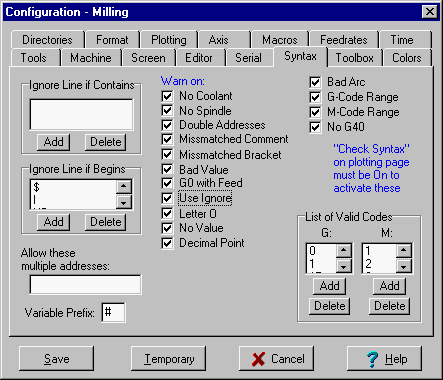
Inplot is able to check certain items in the NC program as it plots. In order to activate these checks they must be turned on with this page and also the "Check Syntax" box on the Plotting page. This way, you can have a set of items to check on this page, and activate the set when you want to with the checkbox on the Plotting Page.
Multiple Addresses
Checking Syntax will report an error when it finds more than one of the same address on a line (except for G codes). If on your machine control it is not an error to have several of the same address (like M codes), then enter those addresses in the edit box.
Ignore Line if Contains
If any of the strings in this list occur anywhere in the line then that line is ignored. This can used to skip any non-standard things in the program that would cause trouble. Enter them into the list box.
Ignore Line if Begins
If there are lines that start with a special string of characters and the lines should be ignored by Inplot, enter those beginning characters into the list box.
Variable Prefix
Fanuc variables start with '#'. This can be set to a different character for other controls.
Like #23=3.0
or
V23=3.0
Okuma variables need to delimited by spaces when setting address value:
N1 G=VC1 X-.3925 Y7.0310 Z=0.6293+VC2 R=.6293+VC3 A41. M15
List of Valid Codes
list boxes for entering valid G-Codes and M-Codes that Inplot can check the codes in the NC program with. Activate the list with the G-Code Range and M-Code Range checkboxes. When activated, any G or M code encountered that is not in this list will cause an error message.
Check Boxes:
No Coolant
Will display error message box when Inplot plots a feed move when the coolant hasn't been turned on with M8 in the program.
No Spindle
Will display error message box when Inplot plots a feed move when the spindle hasn't been turned on with M3,M4 in the program.
Double Addresses
When there are two values of the same address on the line.
Missmatched Comments
When the open and closed parenteses, or whatever the comment symbol is, don't match up.
Missmatched Bracketse
When the '[' and ']' brackets don't evenly match up.
Bad Value
When there is some bad character in the value of the address.
G0 with Feed
When there is a feedrate greater than zero on the same line as a 'G0'. This may indicate that there is a mistake on that line.
Use Ignore
This activates the two lists of Ignore items.
Letter O
This looks for the letter "O" on the line other than the first character, which indicates a probable mistake for the number Zero.
No Value
A letter address with no number after it.
Decimal Point
Checks all the address values according to the address format on the Format Page. If the format says there is no decimal is used in that address it will show an error if it finds one. It doesn't check for finding no decimal point in an address that can use them.
Bad Arc
Will display error message box when Inplot encounters an error in calculating the arc moves.
G-Code Range
Activates the checking of the G-codes found in the program with the list of G-codes in the listbox on this page. If it find one that is not in the list it shows an error.
M-Code Range
Activates the checking of the M-codes found in the program with the list of M-codes in the listbox on this page. If it find one that is not in the list it shows an error.
No G40
Keeps track of whether G41,G42,G40 have been called. Will display error message box when Inplot plots line with M6 or another G41,G42 without calling G40 first.
_______________________________________________________
Copyright © 2020 i-Logic Software