IMS Wizard 4.0
The IMS Font is a True Type Font that can be used to create geometric tolerancing symbols for use in any word processor, database or software that supports True Type Fonts and which the font can be set to the IMS font.
Included is the Geometric Tolerance Wizard for making geometric tolerancing and characteristic symbols and inserting them into documents.
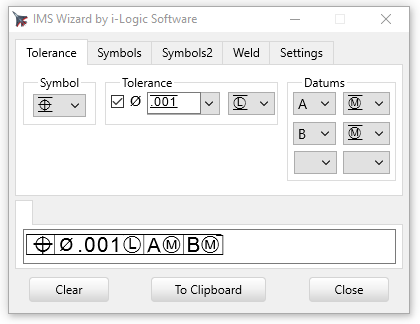
On the Tolerance Page we have a symbol builder that works by choosing the items in the dropdown boxes. The full symbol is displayed at the bottom as it is built. In the Tolerance value you can choose from the ones on the dropdown list or type in your own.
When you have finished building the symbol you click the "To Clipboard" button which puts it in the Windows clipboard. Then go over to your other software, for instance a word processor, put the cursor where you want to insert, and paste it in. Note: In the newer versions, it's usually not neccesary to press the To Clipboard button because what is shown in edit box is always automatically in the clipboard.
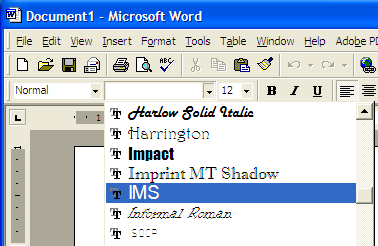
Fonts in your Document: If the font for the document is not set to the IMS font, the symbols will display as garbage characters. In order to display them you can either highlight the symbol and set just that to the IMS font, or what would be easier, set the whole document to the IMS font so that everything you insert will display correctly. The IMS font includes all normal upper and lower case characters so it should not be a problem making the whole document in it.
In Word you may have adjust the vertical spacing in the settings. 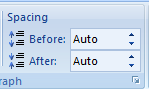 You can highlight just the text you want and space that out.
Symbol Pages: Here is displayed all the symbols contained in the IMS font. each one is a button that you press to insert it into the display on the bottom.
And on both pages of the wizard you can insert regular text characters into the bottom box by typing them from the keyboard.
.png)

Symbols displayed in a word processor document:
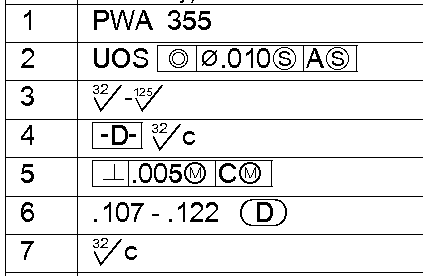
The downloaded installation setup will install the program and font on your computer.
Remember: The symbols will only show up in the document if the IMS font has been installed on that computer, so if you send documents to other people to read, they must also have the IMS font installed on their computer and have the document font set to IMS.
PDF files are different story. See PDF Enbedding.
Microsoft EXCEL
In Microsoft Excel you can set individual columns, cells or the whole sheet to the IMS font. Just select a column or sheet and choose IMS from the font dropdown. this will change the font used for those cells so the symbols will show up.
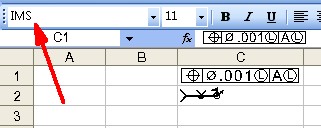
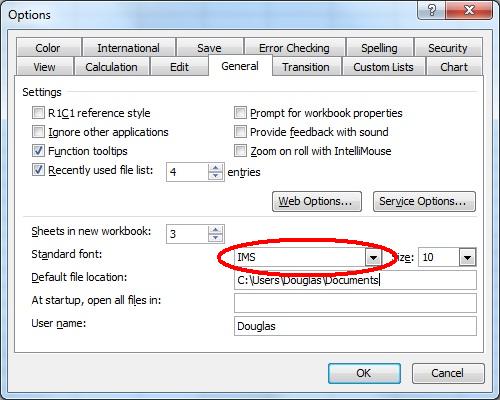
In order for the symbols to show up in the formula bar the Standard Font should be set in Excel program Options.
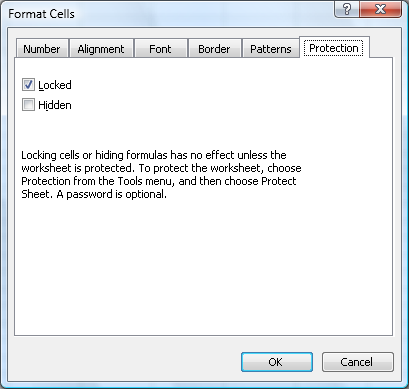
If your worksheet has already been protected and locked with a different font, the IMS font may not paste in. You should unlock it in the Format Cells dialog.
Line spacing
Pasting into some software may result in the outside lines of the box to not show up. They may show up when printing anyway, or you can adjust the Line Spacing in the software you are pasting into.
.png)
.png)
After adjusting the line spacing in Microsoft Word.
.png)
Copyright © 2026 i-Logic Software