Configure: Format
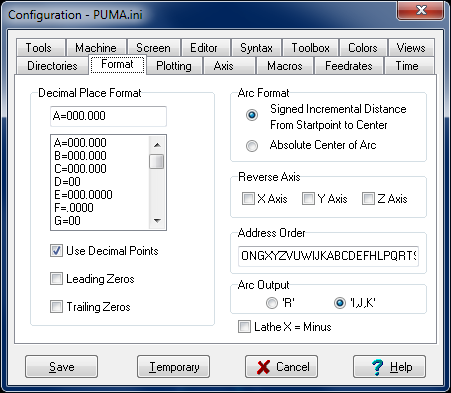
Dialog box displays formatting information for the current format that is loaded.
Decimal Place Format
Each address has a series of zeros and a decimal point that signify the number of places before the decimal point and the number of places after the decimal point in address values. This tells the system how to read a value that does not have any decimal point.
In the case where the control reads decimal points but a number without a decimal point is interpreted as a whole number: use '000.' And check 'Use Decimal Points'.
Check boxes
Use Decimal Points
If this is checked, then whenever a value is input to the editor with the Input buttons it will be with a decimal point. When this is not checked, the number of digits before and after the undisplayed decimal point is controlled by the Decimal Place Format section and the Leading Zeros and Trailing Zeros checkboxes.
Leading Zeros
If this is checked, values output to the editor will have zeros added to the front of the number to fill up the number of places shown in the Decimal Place Format section before the decimal point.
Trailing Zeros
If this is checked, values output to the editor will have zeros added to the end of the number to fill up the number of places shown in the Decimal Place Format section after the decimal point.
Arc Format
Tells the system how to interpret the values in a G02 or G03 block.
Signed incremental distance from start point to center. This is the normal type for FANUC controls.
Absolute center of arc. This means the X,Y,Z values in a G02 or G03 block are the absolute coordinates of the center of the arc.
Reverse Axis
If X Y or Z-Axis is checked, Inplot will reverse that axis in the plotted toolpath on the screen. Also, values automatically inputted into the editor by Inplot will be reversed in that axis.
Address Order
This string of characters represents the order of the addresses on each line. This is used by Order NC and some other features that automatically input values to the editor.
Arc Output
This is used with Reformat and Insert Arc . You can choose whether you want to make arc moves with 'R' values or 'I,J,K' values.
Lathe X = Minus
If this is checked, negative numbers in the X-Axis will be interpreted as positive numbers. Also, the picture of the lathe tool will be reversed to show it cutting on the other side of the part.
See also: Renumber
_________________________________________________________________
Copyright © 2020 i-Logic Software