Renumber
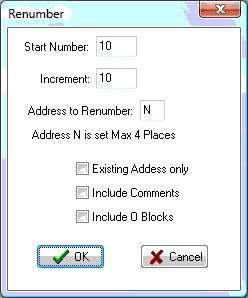
Create new block numbers for the entire editor file, or selected lines
Block numbers are added to all lines except blank line and comments.
First displays dialog box that asks for Start number and Increment. The default values can be changed with Configure Editor.
Other addresses can be renumbered in the same way by entering them into 'Address to Renumber'.
If Existing Address Only is checked, then blocks will only be renumbered if they are already present on the line.
If Include Comments is checked, comment lines will also be renumbered. Normally they are skipped.
If Include O Blocks is checked, 'O' numbers will be renumbered along with 'N' numbers.
If a section of text is selected, only that selection will be renumbered, otherwise renumbering will start at the cursor location.
The number of digits output for the blocknumber depends on the Format settings for the "N" address. If the Increment value is large enough or the file is long enough, the block number will start over. For instance, if the format for the "N" address is set for 3 digits, when the blocknumber increments to 999 the next line will start over at the Start Number.
The Format settings for the address will also determine whether leading zeros are output for the blocknumber.
_________________________________________________________________
Copyright © 2020 i-Logic Software