Wordova Instructions
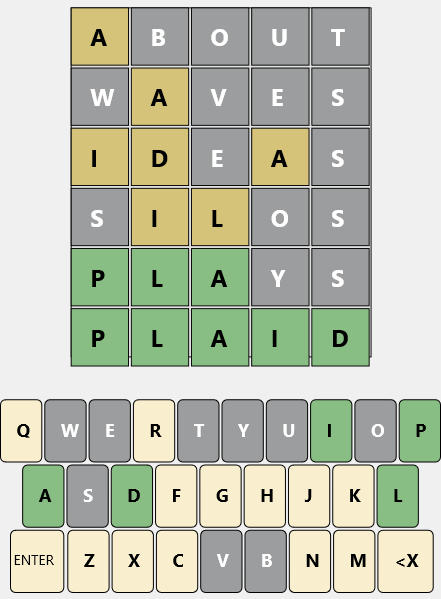
Wordova is a word game of having 6 tries to guess the correct 5 letter word. At start the grid is blank. Wordova has already picked the correct 5 letter answer it is looking for. You type in your first 5 letter word with the keyboard then press ENTER. The letters you enter will be color coded according to how they match. 1. Letters that are not in the answer at all are colored grey; 2. Letters that are in the answer but are not in that position are colored yellow. 3. Letters that are in the correct position in the final answer are colored green. The same letter can appear multiple times in the answer word. There is no special color coding for that.Valid Words
If you type in a 5 letter word and receive a message saying "Not a valid word" that means the word you typed is not in the valid word list. You cant just type in "AEIOU" and expect to get away with it. The word has to be in the valid word list.Backspace
Use the backspace key to delete what you type in the current row before you press enter. You cannot backspace after you press enter and go to the next row.New Game Button
Press the New Game button when you finish the game. The game will clear and reset with a new answer word. Or if you get stuck in the middle of the game and want to start over with a new answer word. Word Rules Proper names are not allowed, but many proper names can be used with a different meaning. Plurals formed by adding -s or -es are not possible solutions, but are valid guesses. Normal past tenses (adding -d or -ed) are the same as plurals.Stats Page
The Statistics page shows a list of the last 100 plays. The real answer, if you won or lost, the date and how many minutes you took.Hard Mode
In Hard Mode you have to follow the hint color in the previous row. If your first guess contains a T and it’s yellow (meaning it’s the correct letter, but in the wrong spot), you must use a T in any subsequent guesses. If your first guess contains a T and it’s green (meaning it’s the correct letter in the correct spot), it has to be in all your next word guesses. You turn on Hard Mode with the check box at the bottom of the Help page. When checked it will give a message when the guess is not valid.


Game


Copyright © 2024 by i-Logic Software
Wordova
If you need to take a break and exit the app when you haven't finished yet, it will
automatically save where you last were and return to that place when you start up
again.
Hints
On the Help page there is a button on the bottom that says, "Hints". Pressing that
brings you to a Hint finding page where you can get some words that have the
needed letters in the proper places. In the 5 boxes at the top enter all letters that
have Green colors (or letters that you want in that position) . In the Grey Chars box
enter the grey colored characters you want to leave out. In the Yellow Chars box
enter the yellow chars. Press Search and it will give you a list of words with those
letters in those places that could be possible hints. These boxes are automatically
filled in with the current grid characters when you press the Hints button.







Wordova Instructions
Wordova is a word game of having 6 tries to guess the correct 5 letter word. At start the grid is blank. Wordova has already picked the correct 5 letter answer it is looking for. You type in your first 5 letter word with the keyboard then press ENTER. The letters you enter will be color coded according to how they match. 1. Letters that are not in the answer at all are colored grey; 2. Letters that are in the answer but are not in that position are colored yellow. 3. Letters that are in the correct position in the final answer are colored green. The same letter can appear multiple times in the answer word. There is no special color coding for that.Valid Words
If you type in a 5 letter word and receive a message saying "Not a valid word" that means the word you typed is not in the valid word list. You cant just type in "AEIOU" and expect to get away with it. The word has to be in the valid word list.Backspace
Use the backspace key to delete what you type in the current row before you press enter. You cannot backspace after you press enter and go to the next row.New Game Button
Press the New Game button when you finish the game. The game will clear and reset with a new answer word. Or if you get stuck in the middle of the game and want to start over with a new answer word. Word Rules Proper names are not allowed, but many proper names can be used with a different meaning. Plurals formed by adding -s or -es are not possible solutions, but are valid guesses. Normal past tenses (adding -d or -ed) are the same as plurals.Stats Page
The Statistics page shows a list of the last 100 plays. The real answer, if you won or lost, the date and how many minutes you took.Hard Mode
In Hard Mode you have to follow the hint color in the previous row. If your first guess contains a T and it’s yellow (meaning it’s the correct letter, but in the wrong spot), you must use a T in any subsequent guesses. If your first guess contains a T and it’s green (meaning it’s the correct letter in the correct spot), it has to be in all your next word guesses. You turn on Hard Mode with the check box at the bottom of the Help page. When checked it will give a message when the guess is not valid.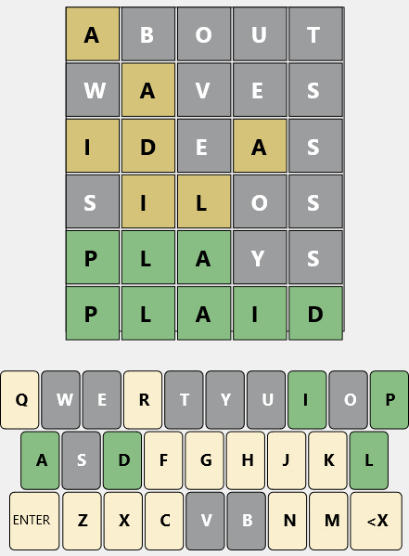




Wordova
Game


Hints
On the Help page there is a button on the
bottom that says, "Hints". Pressing that brings
you to a Hint finding page where you can get
some words that have the needed letters in the
proper places. In the 5 boxes at the top enter
all letters that have Green colors (or letters that
you want in that position) . In the Grey Chars
box enter the grey colored characters you want
to leave out. In the Yellow Chars box enter the
yellow chars. Press Search and it will give you a
list of words with those letters in those places
that could be possible hints. These boxes are
automatically filled in with the current grid
characters when you press the Hints button.